Loading... Please wait...
Categories
 New Products
-
 $2,600.00
-
 $900.00
-
 $430.00
-
 $180.00
-
 $2,600.00
Our Newsletter
- Home
- Sewing Machines
- Bernina 700E Embroidery Machine
- Home
- Embroidery Machines
- Bernina 700E Embroidery Machine
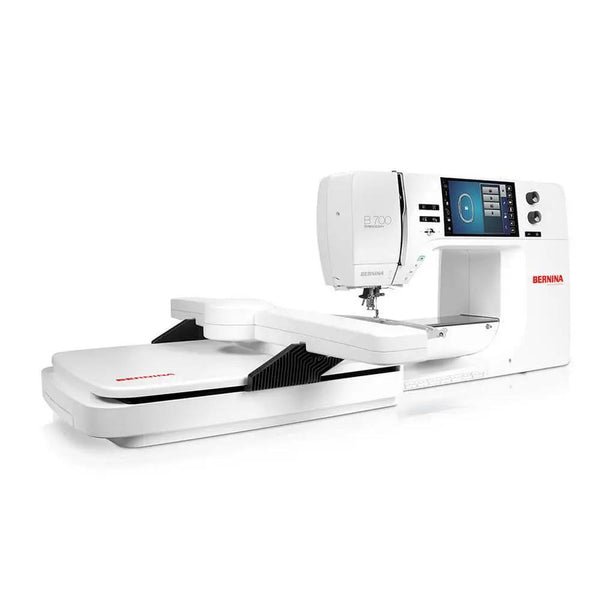
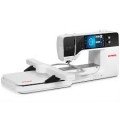
Bernina 700E Embroidery Machine


Product Description
Bernina 700 Embroidery Only Machine
When your work demands more than your machine can deliver — when you're piecing together 14" designs across hoopings, babysitting thread tension on a 45-minute run, or wrestling file formats that your digitizing software speaks but your machine refuses to hear — the Bernina 700E exists to end those compromises.
Built as an embroidery-only machine, the 700E makes no concessions to versatility. Every engineering decision serves one discipline: flawless stitching, every time. The 15.7" x 8.3" embroidery field is among the largest available at any price point, letting you execute full back panels, oversized jacket designs, and large-format commercial work in a single hooping. The jumbo bobbin carries 70% more thread than standard, which means fewer stops on long production runs and more minutes per hour actually stitching. At 1,000 stitches per minute, that efficiency compounds quickly across a full workday.
Pinpoint Placement uses two-point alignment to position designs with the kind of accuracy that separates professional output from close-enough. Adaptive thread tension monitors and self-corrects in real time. Smart Secure automatically ties on and off so you're not going back to clean up loose ends. Native support for eight file formats — EXP, DST, PES, PEC, JEF, PCS, SEW, and XXX — means your entire design library is ready to run without conversion headaches.
SewingMachinesPlus has been an authorized Bernina dealer for over 50 years — with 0% financing available on a machine at this level, that expertise and that relationship are worth as much as anything in the box.
- For beautiful embroidery
- Extra-large embroidery area for large designs
- Embroider longer with the extra-large bobbin
- Clean & brilliant embroidery results
If embroidery is your passion and you want a machine that’s built specifically for it, the Bernina B700E is a standout. This package includes a brand-new machine plus Bernina Embroidery Creator Software 9, which really unlocks its full potential.
The B700E is a dedicated embroidery-only machine, and that focus shows the moment you start stitching. The large embroidery field gives you the freedom to work on bigger designs with fewer re-hoopings—perfect for quilts, jackets, bags, and detailed home décor. Stitch quality is exactly what you expect from Bernina: clean, precise, and beautifully consistent, even on dense or intricate designs.
Design editing is intuitive and powerful right on the machine. You can resize, rotate, mirror, and combine designs, and Pinpoint Placement makes it easy to position embroidery exactly where you want it. This is a huge time-saver and stress-reducer for anyone who’s picky about placement (and let’s be honest, most embroiderers are).
Optional Bernina Embroidery Software V9 takes this setup to the next level. V9 provides advanced design editing, lettering, and customization tools, making it easy to personalize projects or create original designs. It pairs perfectly with the B700E and is ideal for both passionate hobbyists and small embroidery businesses.
Other features embroiderers love:
- Generous built-in design and font library
- Jumbo bobbin for longer stitch-outs with fewer interruptions
- Smooth, quiet operation with solid Bernina build quality
- Designed for serious embroidery without compromise
This combination is ideal for:
- Dedicated embroidery enthusiasts
- Quilters and makers working on larger projects
- Small business or side-hustle embroidery
- Anyone upgrading from a smaller or entry-level embroidery machine
If you’ve been waiting for the right time to invest in a premium embroidery setup, a brand-new Bernina B700E is a fantastic place to land. It’s a machine you can grow into—and one you’ll enjoy every time you sit down to stitch.
Key Features

Enjoy maximum space
- Extra-large embroidery area
- Comfortably create endless designs
- Embroider designs up to 400 x 210 mm
- DOES NOT INCLUDE OPTIONAL MAXI-HOOP (400MM X 210MM)
Three embroidery hoops are included as standard accessories and the optional BERNINA Midi Hoop for midi-sized motifs is also compatible with the B 700 E.

Embroider much longer
- Re-thread without removing the hoop
- Easy access to the front load bobbin
- Plus: Multiple spoolholder included
Embroider with fewer interruptions with the Jumbo Bobbin that holds up to 70% more thread than standard bobbins.

Position your design accurately
- Position designs easily and precisely
- No need to use the template anymore
- Perfect results in short times
Use Pinpoint Placement to position your design precisely: select two points and match them with the markings on the hooped fabric.

Edit your designs with ease
- Align, rotate or resize your design
- Toggle between mm & inch
- Rearrange embroidery designs in combination
Simply Undo or Redo steps while editing or combining designs to return to your initial position. Edit all designs at one time with Group or individually with Ungroup.

Choose your favorite color
- Color your design easily
- Select your personal color scheme
- Embroider your project in beautiful colors
With the Color Wheel, designs can be changed easily and coordinated to your favorite color scheme before you start embroidering.

Intuitive & very easy to use
- Ask how much stabilizer you need
- Toggle between mm & inches
- Reads: EXP, DST, PEC, JEF, PCS, SEW, XXX
For each embroidery technique the consultant helps you to choose the correct foot, needle, thread and stabilizer according to your fabric to achieve the best results.

Clean and brilliant embroidery
- Manage thread cuts with ease
- No manual trimming on top side
- Achieve perfect embroidery results
Securing stitches become invisible as the tie-on/off stitches are sewn in stitch direction. Smart Secure adds tie-on/off stitches to a design, if none are preset.

Combine your designs creatively
- Create curved lettering effects
- Alter stitch density
- Combine alphabets with embroidery
Choose from 320 built-in embroidery designs, 18 built-in embroidery fonts and one large built-in monogram set.
Features and options for embroidery lovers
- Choose from 320 embroidery designs, 18 embroidery fonts and 1 large monogram set - all built-in
- Design editing mode with positioning, mirroring, rotating, combining and resizing of motifs
- Create curved lettering effects
- Alter stitch density
- Combine alphabets with embroidery
- Create beautiful endless embroidery designs
- Resequence complex combinations according to color
- Choose alternative color options before stitching out
- Save your created designs on the machine or USB stick
- Import additional designs to the machine
- Precise positioning of the designs with the Check function
- Help on demand: the Embroidery Consultant and built-in tutorials offer direct on-screen support and answers to your questions whenever you need them
- Use Thread-up Command to lower and raise the needle bringing the bobbin thread to the top of the fabric at the start of stitching leaving the underneath side of an embroidery project beautiful and clean
- Move hoop to back for easy bobbin threading
- Move hoop to center for threading of upper thread
- Move to center of embroidery pattern
- Multiple spool holder for up to 15 threads included
- DOES NOT INCLUDE OPTIONAL MAXI-HOOP (400MM X 210MM)
Further functionality for your comfort

Design editing:
- Design editing mode with positioning, mirroring, rotating, combining and resizing of motifs
- Alter stitch density
- Import additional designs to the machine
Personal settings:
- Save your created designs on the machine or USB Stick
- Save and retrieve your personal settings on the machine
Features and Functions
Overview
- Centrally Located Color Touch Screen
- 7” / 18 cm
- Upper Thread Sensor
- Indicates when the upper thread breaks or runs out.
- Embroidery Area
- 15.7" x 8.3"
- DOES NOT INCLUDE OPTIONAL MAXI-HOOP (400MM X 210MM)
- Freearm Embroidery
- Easy freearm embroidery with all embroidery hoops without additional tools. For embroidering tubular items such as pant legs, t-shirts, onesies, etc.
- Built-in Embroidery Designs
- 320
- Endless Embroidery
- Perfect for embroidered borders that are longer than the hoop. Stitched reference marks and on-screen animations ensure precise re-alignment during rehooping.
- Color Wheel
- Quickly change the colorway of your design on-screen to get an impression with other color design. New colors are assigned to the current thread library.
- 2-Point Placement
- For easy positioning and alignment to place embroidery designs accurately. Rotate and align designs when the project is crooked. Possibility of grid point or free point positioning.
- Group/Ungroup
- Objects can be easily grouped and edited at the same time. Depending on the design, it can be split using the ungroup function in order to edit or delete individual parts.
- Undo/Redo
- Undo and redo steps when on-screen editing.
Embroidery
- Maximum Embroidery Speed (Stitches per minute)
- 1000
- Embroidery Area
- 15.7" x 8.3"
- DOES NOT INCLUDE OPTIONAL MAXI-HOOP (400MM X 210MM)
- Freearm Embroidery
- Easy freearm embroidery with all embroidery hoops without additional tools. For embroidering tubular items such as pant legs, t-shirts, onesies, etc.
- Built-in Embroidery Designs
- 320
- Embroidery Alphabets
- 18
- On-screen Editing of Designs
- Easily and quickly edit embroidery designs directly on the touch screen.
- Duplicate/Add Designs
- Increase the number of designs quickly with duplicate. Use + to combine designs and lettering onscreen.
- Change Design Size Proportionally
- Enlarge or reduce designs proportionally on-screen. Increasing/decreasing in a range of +/- 20% provides the best results. Other ranges should be tested first.
- Change Design Size Non-Proportionally
- Change the height and width independently. Increasing/decreasing in a range of +/- 20% provides the best results. Other ranges should be tested first.
- Move, Rotate, and Mirror
- Move designs through drag and drop or the multi-function knobs; Rotate in 1 degree increments and mirror image embroidery designs for optimal placement on projects.
- Endless Embroidery
- Perfect for embroidered borders that are longer than the hoop. Stitched reference marks and on-screen animations ensure precise re-alignment during rehooping.
- WordArt
- Create vertical, horizontal and curved baselines. Adjust letter spacing to create the best look.
- Drag & Drop
- Simple drag and drop allows for easy positioning of embroidery designs.
- Virtual Positioning
- Place every design to an exact stitch and see the visualization in the hoop on the screen.
- Absolute Check Design Positioning
- Design placement tool – stitch by stitch. Check individual stitch locations for precise placement on the project from the Edit screen. the needle moves to that location in the hoop.
- 2-Point Placement
- For easy positioning and alignment to place embroidery designs accurately. Rotate and align designs when the project is crooked. Possibility of grid point or free point positioning.
- Check Design Size
- Tool for placing designs. Check the embroidery design size. The center of the pattern can also be displayed.
- Group/Ungroup
- Objects can be easily grouped and edited at the same time. Depending on the design, it can be split using the ungroup function in order to edit or delete individual parts.
- Rearrange designs
- Change the stitching order of designs by changing the order of the layers.
- Undo/Redo
- Undo and redo steps when on-screen editing.
- Adjust Stitch Density
- Change Stitch Density to complement varied fabric.
- Change Stitch Type
- Change a satin stitch to a fill stitch to minimize long satin stitches that may catch.
- Change Thread Brand
- Quickly change thread color and/or brand on-screen to suit your project at hand.
- Basting
- Stitch your choice of basting stitches before embroidering. Choose to baste around your design or the inner hoop.
- Color Resequence
- Several identical colors of an embroidery design are combined into one color, thus reducing the number of color changes to a minimum. Saves time.
- Stitch Design as Single/Multi-Color
- Stitch an entire design in one color without stopping or as a multi-color design.
- Personal Memory for Saving Embroidery Designs
- Own combinations, altered embroidery designs or external designs can be stored.
- Programmable Jump Stitch Cutting
- Set any length of jump stitches to be cut and eliminate manual cutting.
- Smart Secure
- Missing tie-on/off stitches are added automatically if none were programmed.
- Invisible Secure
- Enhanced tie-on/off stitch formation is completely invisible under design.
- Centering the Embroidery Design
- Off-center design positioning can be saved to the machine and design position in hoop is imported as set in the BERNINA Embroidery Software.
- Thread Away Mode
- An automatic, quick movement of the hoop ensures thread tails are transferred to the wrong side of the project. Set on/ off as desired depending on design.
- Switch Unit of Measurement
- Choose to view embroidery design dimensions and hoop sizes in inches or millimeters.
- Creative Consultant Embroidery
- Get reliable support for various applications and fabrics from the integrated Embroidery Consultant. Makes suggestions regarding needles, presser foot, stabilizer etc.
- Multi-format Design compatible
- No need to convert. Reads EXP, DST, PES, PEC, JEF, PCS, SEW, XXX.
- Embroidery Design Import/Export via USB Interface
- Enjoy rapid and direct connectivity for design transfer and updates.
- Automatic Hoop Recognition
- The attached hoop is automatically recognized by the embroidery module.
- View Stitch-out Time, Thread Colors, Size, Stitches
- View design details at a glance.
- Embroidery Sequence Control
- This function helps to reposition the embroidery position after a thread breakage. You can move forward or backward stitch-by-stitch or in steps of 50.
- Position Recall
- The last embroidered stitch is always saved so that embroidery can be resumed at exactly the same point in the project in case of a power failure.
- Embroidery Module
- Embroidery Module L (SDT)
General
- Sewing space to the right of the needle
- 10”
- Workspace Height
- 5"
- Weight of the Machine
- 30.9 lb
- Measurements (W x H x D)
- 20.5″ / 8.4″ / 14.1″
- Centrally Located Color Touch Screen
- 7” / 18 cm
- Total Memory
- 256 MB
- Multi-function Knobs
- Easily accessible knobs for making stitch adjustments before and during sewing in .05 increments for smooth stitch transitions. Used in embroidery for composing and design alterations.
- Spool Holders
- 2
- LED Sewing Light
- 30
- Semi-automatic Needle Threader
- Easy threading of the needle.
- Manual Thread Cutters
- 3
- BERNINA Adaptive Thread Tension
- Once the tension is set according to the fabric and thread used, the thread tension is constantly monitored and adjusted automatically, if needed, resulting in the finest stitching.
- Hook system
- The innovative BERNINA Hook maintains legendary BERNINA stitch quality at 5.5 mm and 9 mm stitch widths. An easy bobbin case insertion and large capacity bobbin make this ideal.
- Jumbo Bobbin with 70 % more Capacity
- More thread on the bobbin ensures significantly fewer interruptions in sewing, which is particularly helpful for large quilts or when embroidering.
- Bobbin Winding while Sewing/Embroidering
- Fast winding of the bobbin, even while sewing.
- Powerful DC Motor
- Full power at all speeds provides for consistent stitching on multiple layers and heavy fabrics.
- Hammer Mode
- Built-in mechanism that drives the needle to stitch through more than 30 layers of fabric. The needle pulsates through the fabric to form the stitch.
- BERNINA Foot Control
- Consistent control and a back-kick function to raise and lower the needle. One single push onto the front sews one stitch, one heel push makes the needle move up or down.
- Needle Stop Up/Down
- The needle can be programmed to stop in the raised (up) or lowered (down) position.
- Automatic Presser Foot Lifter
- Convenient automatic presser foot lowering and raising. Press the foot control to lower the presser foot, and sewing or embroidering can be started. At the end of the sewing or embroidery process, the foot is raised automatically.
- Automatic Thread Cutter
- The upper and lower threads are cut automatically or at the touch of a button. The top thread is carried to the back side of the fabric. Program 2 types of tie-offs.
- Needle Reminder
- To save the settings for the needle type used.
- Lower Thread Sensor
- Warns when the bobbin thread runs low.
- Upper Thread Sensor
- Indicates when the upper thread breaks or runs out.
- On-screen Help
- Use the '?' to identify functions and stitches. Built-in animations lead you through processes and provide reminders.
- eco Mode
- The eco mode saves energy and provides a child safety lock.
- Slide speed control
- Regulate the speed with the Slide Speed Control.

Add to Wish List
Related Products
-
-
-
-
 Bernina E16 Pro Embroidery Machine Package $15,200.00
-